You are using an out of date browser. It may not display this or other websites correctly.
You should upgrade or use an alternative browser.
You should upgrade or use an alternative browser.
Moneybookers Payment + Novus Fluid
- Thread starter walter
- Start date

- Messages
- 5,092
- Website
- www.xenfocus.com
Hello,
The width can be edited under .pageWidth to a percentage which will turn the skin fluid.
Payments can be made via moneybookers to admin (at) ipbforumskins.com (replacing (at) with @). Send a PM to me and let me know what skin you'd like once the payment has been sent and I'll upgrade your account.
The width can be edited under .pageWidth to a percentage which will turn the skin fluid.
Payments can be made via moneybookers to admin (at) ipbforumskins.com (replacing (at) with @). Send a PM to me and let me know what skin you'd like once the payment has been sent and I'll upgrade your account.
- Messages
- 5,092
- Website
- www.xenfocus.com
Hi,
Thanks for your payment.
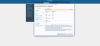
The width can be adjusted by going to the Styles page in your admin cpanel, selecting Novus and choosing the General group. From there, select Page Width Controller in the left menu and you'll see the box to edit the width.
Thanks for your payment.
The width can be adjusted by going to the Styles page in your admin cpanel, selecting Novus and choosing the General group. From there, select Page Width Controller in the left menu and you'll see the box to edit the width.
- Messages
- 5,092
- Website
- www.xenfocus.com
Add the following to extra.css once you've made your width a percentage.
Code:
#footer .pageWidth{ margin: 0 !important; }Ok, thx. Maybe you can release a finished fluid Style in the Future? I am sure, that many People will love the fluid Version.
There is only 1 Proplem left: As you can see the Prefix is in the first Line, the line to enter the Text is below that. This is not normal, isnt it? Do you know how i can fix this?
There is only 1 Proplem left:
As you can see the Prefix is in the first Line, the line to enter the Text is below that. This is not normal, isnt it? Do you know how i can fix this?
- Messages
- 5,092
- Website
- www.xenfocus.com
Hi,
What does it look like using the default skin?
What does it look like using the default skin?
With the Default Skin everything is ok, also with other XenForo Skins. And i have noticed there is a Error, when you visit the Novus Style with a Tablet PC, the Registration Button is twice there. It seems you have to work a little bit on that Style.

- Messages
- 5,092
- Website
- www.xenfocus.com
Seems like the tablets don't fully support the webkit reflect property..
Remove the following from extra.css
Remove the following from extra.css
Code:
#SignupButton{ -webkit-box-reflect: below 0px -webkit-gradient(linear, left top, left bottom, from(transparent), color-stop(.5, transparent), to(rgba(255,255,255,0.2))); }Sorry to resurrect an oldish thread, but I have the same issue with the Novus style, using a PC
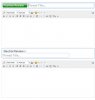
I added three thread prefixes, two work ok, but the third creates the same problem as above.
See the screenshot below, positive/negative works fine, but "Neutral" does not.
Can't understand why.
I added three thread prefixes, two work ok, but the third creates the same problem as above.
See the screenshot below, positive/negative works fine, but "Neutral" does not.
Can't understand why.
Attachments
- Messages
- 5,092
- Website
- www.xenfocus.com
Hello,
It may be because the Neutral is just slightly too large for the available width. If you can PM me with an admin login, I can take a closer look, however I'm not entirely sure of a solution at this point since I'm not too familiar with that error. Does it happen in all browsers?
It may be because the Neutral is just slightly too large for the available width. If you can PM me with an admin login, I can take a closer look, however I'm not entirely sure of a solution at this point since I'm not too familiar with that error. Does it happen in all browsers?
Odd, if I change Neutral to "Neutra" (removing the L) it fits ok, as soon as I add another letter, it drops down to the next line
I'm using Firefox when I took those screenshots
When I use IE, it shows that weirdness regardless of whether a prefix is selected or not, hehe
Sure I'll pm you a login, thanks Ehren
I'm using Firefox when I took those screenshots
When I use IE, it shows that weirdness regardless of whether a prefix is selected or not, hehe
Sure I'll pm you a login, thanks Ehren